Learn the best branching Git workflow to follow with 7 proven strategies used by top developers and teams. Discover popular Git workflows, avoid merge conflicts, and improve collaboration with practical examples and step-by-step guidance.
Table of Contents
What Is a Git Branching Workflow?
A Git branching workflow is a structured set of rules and conventions that defines how a team creates, names, merges, and deletes branches in a Git repository. Rather than letting developers commit directly to main in an uncoordinated way, a workflow imposes a shared process that keeps the codebase stable, reviewable, and deployable at all times.
Think of Git branches as parallel universes for your code. Each branch is an isolated environment where changes can be made without affecting the main codebase. A workflow defines when to create a branch, how to name it, where it branches from, and how it gets merged back.
Definition
How Branching Improves Team Collaboration
Without a defined workflow, teams routinely encounter broken builds, lost commits, and integration nightmares. A proper branching strategy solves these problems by establishing clear rules everyone follows:
Key Collaboration Benefits
→ Isolated environments for testing and review
→ Clear ownership of code changes
→ Safe hotfix deployment without feature code
→ Reproducible release history
→ Easier onboarding for new developers
Why Choosing the Best Branching Git Workflow Matters
The Git workflow you choose has a direct, measurable impact on your team’s velocity, code quality, and ability to ship. It is not merely an internal convention — it shapes your entire CI/CD pipeline, release cadence, and code review culture.
Impact on Code Quality and Releases
Teams with a well-defined branching strategy ship code that is significantly more stable. Because features are isolated in branches, a bad commit on a feature branch never touches main until it has been reviewed and tested. This single constraint catches a large percentage of bugs before they reach production.
# ❌ Without a workflow — chaotic, risky
$ git checkout main
$ git add .
$ git commit -m "added stuff"
$ git push origin main   # directly to main — no review, no tests

# ✅ With a structured workflow — safe, reviewable
$ git checkout -b feature/user-auth develop
# ... implement, test, commit ...
$ git push origin feature/user-auth
$ gh pr create --base develop --title "Add user authentication"
# → code review → CI passes → merge → protected main stays cleanCommon Problems Without a Workflow
Broken Main Branch
main break builds for the entire team, blocking all deployments.Merge Conflict Avalanche
No Rollback Path
Best Branching Git Workflow Practices to Follow (Overview of Top Models)
There is no single universally “correct” Git workflow — the best one for your team depends on your project size, deployment frequency, and team culture. Below is a quick comparison of the seven most widely adopted strategies:
| Workflow | Complexity | Release Style | Best For |
|---|---|---|---|
| Git Flow | High | Scheduled releases | Versioned software, apps |
| GitHub Flow | Low | Continuous deployment | Small teams, SaaS |
| GitLab Flow | Medium | Environment-based | CI/CD with staging |
| Trunk-Based | Low–Medium | Continuous integration | Agile, high-frequency |
| Feature Branch | Low | Per-feature merge | Beginner teams |
| Release Branch | Medium | Controlled releases | Enterprise software |
| Forking | Medium | Pull request based | Open source projects |
Pro Tip
Git Flow Workflow Strategy (Structured and Release-Friendly)
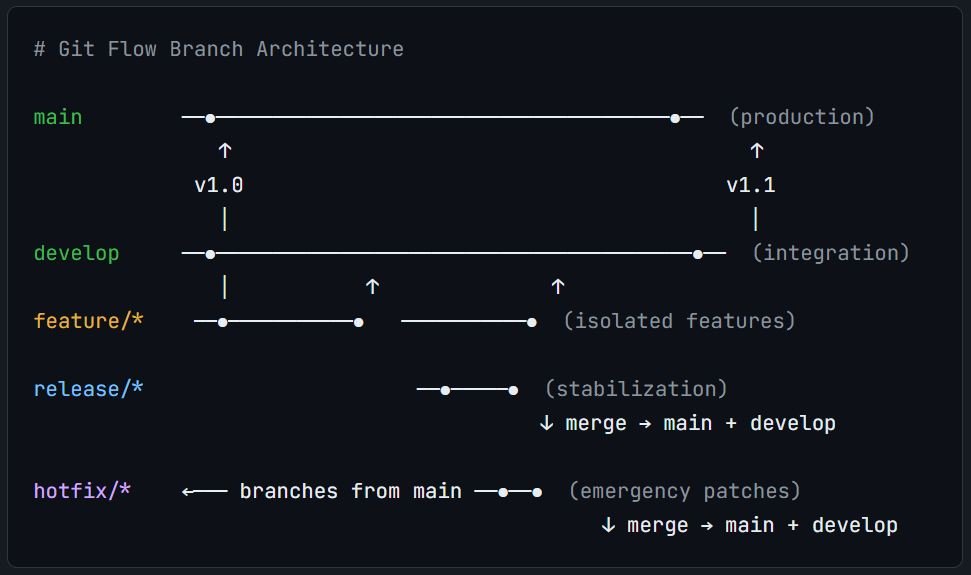
Git Flow, introduced by Vincent Driessen in 2010, is one of the most influential branching models ever published. It defines a rigid but powerful structure built around two long-lived branches — main and develop — plus three types of supporting branches.
Key Branches
# 1. Initialize Git Flow in your repo
$ git flow init

# 2. Start a new feature
$ git flow feature start user-authentication
# → creates: feature/user-authentication from develop

# 3. Finish the feature (merges into develop, deletes branch)
$ git flow feature finish user-authentication

# 4. Create a release branch
$ git flow release start 1.2.0
# → creates: release/1.2.0 from develop
# → bump version, write changelog, final QA...

# 5. Finish the release
$ git flow release finish 1.2.0
# → merges into main + develop, creates tag v1.2.0

# 6. Emergency hotfix
$ git flow hotfix start fix-payment-crash
# → branches from main directly
$ git flow hotfix finish fix-payment-crash
# → merges into main + develop, taggedPROS
+ Hotfix path never touches unreleased code
+ Works well with versioned software
+ Excellent for parallel release support
CONS
− Long-lived branches increase merge risk
− Not suited for continuous deployment
− Overhead can slow down iteration
Ideal Scenario
GitHub Flow (Simple and Fast Deployment)
GitHub Flow strips everything back to the essentials. There is only one long-lived branch — main — and all work happens in short-lived topic branches that merge back through a pull request. Once merged, you deploy. That’s it.
# Step 1: Branch from main
$ git checkout main && git pull
$ git checkout -b feature/add-dark-mode

# Step 2: Commit small, focused changes
$ git add .
$ git commit -m "feat: implement dark mode toggle"
$ git push origin feature/add-dark-mode

# Step 3: Open a Pull Request → discuss → CI runs
$ gh pr create --base main --fill

# Step 4: Merge into main after approval
# Step 5: Deploy immediately from main
# Step 6: Delete the branch
$ git branch -d feature/add-dark-modeGitHub Flow Rule
main branch must always be deployable. If it merges into main, it must be production-ready. This invariant is the entire foundation of the workflow.Best Use Cases for Small Teams
GitHub Flow Works Best When
→ Your team has fewer than 10 developers
→ You run a web app or SaaS product
→ You have solid automated test coverage
→ Feature flags manage incomplete features
→ Rollback = redeploy previous commit
Ideal Scenario
GitLab Flow (Environment-Based Workflow)
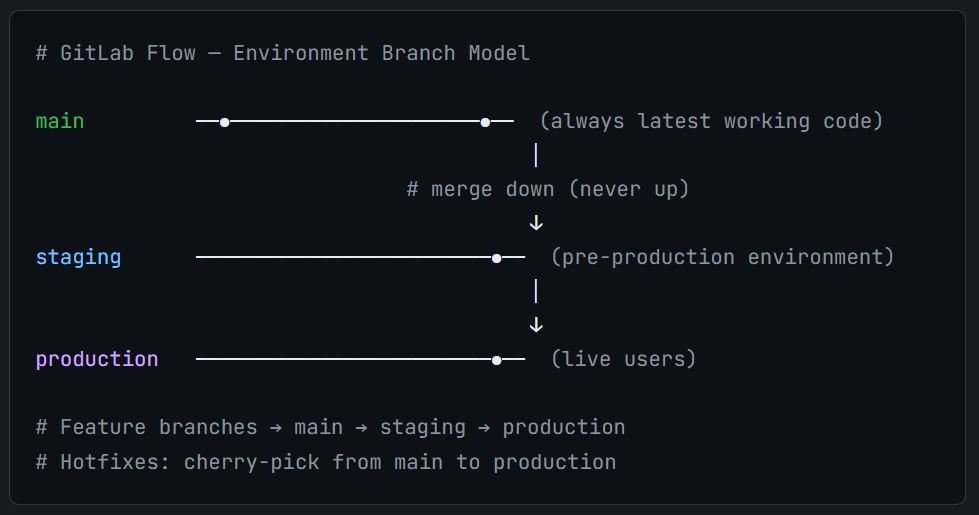
GitLab Flow bridges the gap between Git Flow (too complex) and GitHub Flow (too simple for multi-environment teams). It adds environment branches — like staging and production — that mirror your actual deployment pipeline.
# Feature development → main
$ git checkout -b feature/checkout-redesign main
# ... develop, PR, review, merge to main ...

# Promote to staging
$ git checkout staging
$ git merge main
$ git push origin staging
# → triggers staging deployment via CI/CD

# After QA on staging, promote to production
$ git checkout production
$ git merge staging
$ git push origin production
# → triggers production deployment

# Emergency cherry-pick (hotfix to production)
$ git checkout production
$ git cherry-pick abc1234 # specific fix commit from mainBenefits for CI/CD
PROS
+ Easy to trace what’s in staging vs prod
+ Cherry-pick hotfixes precisely
+ Simpler than Git Flow
+ Integrates naturally with GitLab CI
CONS
– Merge discipline critical (always merge down)
– Slightly more complexity than GitHub Flow
– Cherry-picks can cause drift if overused
Trunk-Based Development (Modern Agile Approach)
Trunk-Based Development (TBD) is the workflow favored by high-performance engineering teams at Google, Facebook, and Netflix. Developers commit directly to trunk (or main), or use very short-lived branches that live no longer than one or two days.
Key Requirement
# Short-lived branch: max 1–2 days
$ git checkout -b users/alex/add-rate-limiting main
$ git commit -m "feat: add rate limit middleware"
$ git push origin users/alex/add-rate-limiting
$ gh pr create --base main   # immediate PR, immediate review

# Feature flags hide incomplete work in trunk
# Example in code:
if (featureFlags.isEnabled('new-checkout-v2')) {
  // incomplete feature — safely off in production
}

# Multiple commits per day to trunk are normal
# CI must run in under 10 minutes to maintain velocityContinuous Integration Benefits
Why Elite Teams Choose Trunk-Based Development
→ Broken code discovered in hours, not weeks
→ Faster feedback loops from CI
→ Encourages small, reviewable commits
→ Enables multiple daily deployments
→ Reduces “integration hell” entirely
Ideal Scenario
Feature Branch Workflow (Beginner-Friendly)
The Feature Branch Workflow is the simplest structured approach and a natural first step for teams moving beyond “everyone commits to main.” Each new feature lives in its own dedicated branch until it is finished and reviewed. This is likely what most developers learn first.
# 1. Create a feature branch from main
$ git checkout main
$ git pull origin main
$ git checkout -b feature/shopping-cart

# 2. Work on the feature, commit regularly
$ git add src/cart/
$ git commit -m "feat: add shopping cart state management"
$ git commit -m "feat: add cart item removal"
$ git commit -m "test: add cart unit tests"

# 3. Stay up to date with main (rebase preferred)
$ git fetch origin
$ git rebase origin/main

# 4. Push and open pull request
$ git push origin feature/shopping-cart
# → PR opened → review → CI passes → squash merge → deleteCode Review Advantages
Because each feature is isolated in a branch, pull requests are scoped to exactly one concern. Reviewers can see a clean diff of just the shopping cart changes — not mixed in with unrelated styling fixes or config updates. This dramatically improves review quality and speed.
Squash Merging Tip
main. This keeps your main branch history readable: one commit = one feature.Release Branch Workflow (Controlled Releases)
The Release Branch Workflow is used by teams that need to stabilize a release independently from ongoing feature development. Once a release branch is cut, only bug fixes and documentation changes are allowed — new features continue on main or develop.
# Cut a release branch from main when feature-complete
$ git checkout main
$ git checkout -b release/2.4.0

# Only bug fixes on release branch
$ git commit -m "fix: correct discount rounding error"
$ git commit -m "docs: update changelog for 2.4.0"

# When stable, merge into main AND back into develop
$ git checkout main
$ git merge --no-ff release/2.4.0
$ git tag -a v2.4.0 -m "Release v2.4.0"

$ git checkout develop
$ git merge --no-ff release/2.4.0

# Long-term support: keep release/2.3.x alive for patches
$ git checkout release/2.3.x
$ git cherry-pick abc1234 # backport critical fixHandling Bug Fixes During Stabilization
Release Branch Rules
→ All bug fixes merged back to develop
→ Semantic version tag applied at release
→ QA runs exclusively on the release branch
→ Release notes generated from commits
→ Old release branches kept for LTS support
Forking Workflow (Open Source Collaboration)
The Forking Workflow is the foundation of open source collaboration. Instead of cloning the project repository directly, contributors fork it to create their own server-side copy, make changes there, and then submit a pull request to the upstream repository. No contributor ever pushes directly to the canonical repo.
# 1. Fork the repo via GitHub/GitLab UI, then clone YOUR fork
$ git clone https://github.com/YOUR-USERNAME/awesome-project.git
$ cd awesome-project

# 2. Add upstream as a remote (the canonical repo)
$ git remote add upstream https://github.com/original-org/awesome-project.git

# 3. Sync with upstream before starting work
$ git fetch upstream
$ git rebase upstream/main

# 4. Create a feature branch on YOUR fork
$ git checkout -b fix/typo-in-readme
$ git commit -m "docs: fix typo in installation guide"

# 5. Push to YOUR fork, open PR to upstream
$ git push origin fix/typo-in-readme
# → open pull request: YOUR fork → upstream/main
# → maintainer reviews and merges (or requests changes)How External Contributors Work
The Forking Workflow gives maintainers total control over what enters the official codebase. No contributor — no matter how trusted — can push to the canonical repository without an approved pull request. This is why every major open source project (Linux, React, Python) uses this model.
Security Benefit
Ideal Scenario
How to Choose the Best Branching Git Workflow for Your Team
No workflow is universally superior — the right choice depends on three key variables. Use this decision framework before committing to a strategy:
Team Size
5–20: Feature Branch
20+: Git Flow or TBD
Project Complexity
Multi-env: GitLab Flow
Versioned: Git Flow
Deploy Frequency
Weekly: Feature Branch
Scheduled: Git Flow
Team Size Considerations
Small teams (1–5 developers) benefit most from simplicity. GitHub Flow or the Feature Branch Workflow minimizes overhead while keeping main protected. Adding Git Flow’s complexity to a 3-person startup introduces bureaucracy with no benefit.
Medium teams (5–20) often need more structure. The Feature Branch Workflow combined with protected branches and required reviews gives the right balance of safety and speed. GitLab Flow works well if you have distinct staging environments.
Large teams (20+) benefit from Trunk-Based Development’s integration discipline — long-lived branches are the primary source of pain at scale. Alternatively, Git Flow provides structure if you have multiple simultaneous major versions.
Deployment Frequency
Deployment Frequency Decision Rule
Best Practices for Git Branching Workflows
Regardless of which workflow you adopt, these practices will significantly improve your team’s experience with Git branching:
Enforce Branch Naming Conventions
Use consistent prefixes like feature/, fix/, hotfix/, chore/, and release/. Add ticket numbers when applicable: feature/PROJ-421-user-auth. This makes branch lists scannable and searchable.
Keep Branches Short-Lived
The longer a branch lives, the more diverged it becomes from main. Aim for branches that merge within 1–3 days. If a feature is too large, break it into smaller deliverable chunks using feature flags.
Protect Your Main Branch
Configure branch protection rules: require pull request reviews, require CI to pass, require up-to-date branches before merging, and restrict who can push directly. This is your last line of defence.
Rebase Over Merge for Linear History
Use git rebase to keep feature branches up to date instead of merge commits. This produces a linear, readable history on main that is easier to bisect and revert.
Write Meaningful Commit Messages
Follow the Conventional Commits specification: feat:, fix:, chore:, docs:, refactor:. Your commit messages are the changelog — treat them accordingly.
Delete Branches After Merging
Stale branches are noise. Configure your repository to automatically delete branches after a pull request is merged. Keep your branch list clean and focused on active work.
Use Pull Request Templates
Standardize PR descriptions with a template: what changed, why it changed, how to test it, and any breaking changes. This dramatically improves review quality and speeds up the merge process.
# ✅ Good branch names
feature/PROJ-421-user-authentication
fix/PROJ-389-cart-total-rounding
hotfix/production-login-crash
release/2.5.0
chore/upgrade-react-18
docs/update-api-reference

# ❌ Bad branch names
my-branch           # Who owns it? What does it do?
fix                 # Fix what?
WIP                 # Work in progress forever
johns-new-stuff     # No type, no ticket, no description
test123 # Temporary name that became permanentCommon Mistakes to Avoid in Git Workflows
Long-Running Branches
Poor Communication About Branch State
Ignoring Code Reviews
Unprotected Main Branch
main is the most common cause of broken production. Even a solo developer benefits from branch protection — it forces self-review and CI validation before any change lands.Cherry-Pick Abuse
Critical Warning
git push --force) to shared branches. It rewrites history that your teammates have already based their work on, causing commits to be lost and collaboration to break down entirely.Final Thoughts on the Best Branching Git Workflow to Follow
Choosing the right Git branching workflow is one of the highest-leverage engineering decisions your team will make. The wrong workflow will create daily friction — merge conflicts, broken builds, chaotic deployments. The right one becomes invisible: it just works, and your team ships faster because of it.
Quick Decision Summary
| Your Situation | Recommended Workflow |
|---|---|
| Small team, rapid web deployment | GitHub Flow |
| Versioned software or mobile apps | Git Flow |
| Multi-environment CI/CD pipeline | GitLab Flow |
| High-frequency Agile team | Trunk-Based Development |
| New team, learning Git collaboration | Feature Branch Workflow |
| Enterprise, controlled release schedule | Release Branch Workflow |
| Open source or external contributors | Forking Workflow |
Tips for Getting Started
Start simple. If you currently have no workflow, the Feature Branch Workflow is a safe first step. Add branch protection rules to main, require one reviewer on every PR, and run basic CI checks. These three changes alone will measurably improve your code quality within weeks.
Document your workflow. Write a CONTRIBUTING.md that describes your branching conventions, commit message format, and PR process. New team members should be able to understand the workflow without asking anyone.
Evolve over time. The right workflow for a 3-person startup is not the right workflow for a 50-person engineering organization. Revisit your branching strategy annually and adjust as your team, tooling, and deployment frequency change.
The Golden Rule of Git Workflows
See also best practices for Git Branch Naming Conventions that developers mostly use.