Learn the differences between Git merge and rebase with practical examples. Discover when to use each strategy, avoid common mistakes, and improve your Git workflow. Perfect for beginners and experienced developers.
Table of Contents
Introduction to Git Merge vs Rebase
If you’ve spent any time working in a team that uses Git, you’ve almost certainly run into the git merge vs rebase debate. Both commands accomplish the same fundamental goal — integrating changes from one branch into another — yet they do so in profoundly different ways, with very different consequences for your repository history.
Why This Topic Matters
Choosing between merge and rebase isn’t just an aesthetic preference. It directly impacts:
- How readable your Git history is for future team members
- How easy it is to debug regressions using
git bisect - The risk of data loss or broken collaboration on shared branches
- Whether your CI/CD pipelines behave predictably on every push
Common Confusion Among Developers
Many developers use merge by default because it’s what Git suggests and feels safest. Others gravitate toward rebase after reading that it produces a “cleaner” history, but then apply it in dangerous situations. The truth is both tools are correct — in the right context. This guide will give you the clarity to choose confidently every time.
Prerequisite Knowledge
Git merge vs rebase diagram
Nothing clarifies the git merge vs rebase distinction faster than seeing the commit graphs side by side. Here’s a text-art representation of what each approach produces, starting from the same initial state.
Starting State — Both scenarios begin here
main branch with commits A → B → C. You created feature from commit B and added commits D and E. Meanwhile, main received commit C.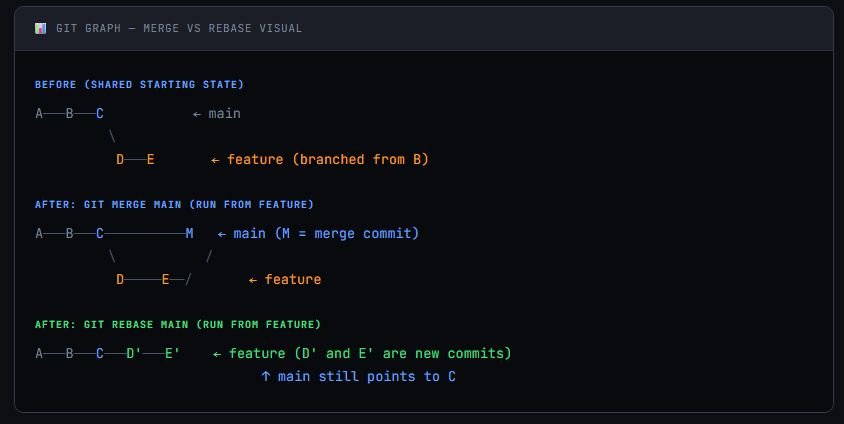
Notice how after rebase, commits D and E become D' and E' — same changes, but entirely new commit objects. The branch history is now perfectly linear, as if you had started your feature after commit C was made. After a fast-forward merge into main, the line is clean with no branching at all.
What Is Git Merge Branch Into Another Branch?
Git merge is the process of taking the histories of two branches and combining them into a single unified branch. It creates a new merge commit that has two parents — one from each branch being joined. Importantly, it preserves the full history of both branches exactly as they occurred.
How Merge Works
When you run git merge, Git finds the common ancestor of the two branches (called the merge base), computes the differences introduced by each branch since that point, and combines those changes into a new merge commit. The original branch pointers and their commit timestamps are left completely intact.
This means your history accurately reflects what really happened: two developers worked in parallel, then their work was joined at a specific point in time.
Git merge — basic usage
# Switch to the target branch (e.g., main or develop)
git checkout main

# Merge the feature branch into the current branch
git merge feature-branch

# Or create a merge commit even if fast-forward is possible
git merge --no-ff feature-branchMerge made by the 'recursive' strategy.
src/auth.js | 42 ++++++++++++
src/utils.js | 18 +++++
tests/auth.test.js | 30 ++++++++++
3 files changed, 90 insertions(+)Merge — What Your History Looks Like
feature-branch into main, your log will show a branching structure with a merge commit at the tip. Every original commit from both branches is preserved with its original timestamp and author. The merge commit itself shows exactly when the integration happened.Running
git log --oneline --graph will reveal the characteristic “diamond” shape that identifies a merge point.What Is Git Rebase?
Git rebase rewrites history by replaying your branch’s commits on top of another branch’s tip. Instead of creating a merge commit, rebase takes each commit from your feature branch and re-applies it, one by one, onto the target branch — producing brand-new commit objects with different SHAs, even if the code changes are identical.
How Rebase Works (Rewriting History)
The word “rebase” literally means “change the base.” When you rebase a feature branch onto main, Git:
Finds the common ancestor
Saves your commits as patches
Moves the branch pointer
Re-applies commits
Git rebase — basic usage
# Switch to your feature branch
git checkout feature-branch

# Rebase onto main — replays your commits on top of main's latest commit
git rebase main

# Interactive rebase — lets you squash, reorder, or edit commits
git rebase -i main

# Rebase onto a specific commit hash
git rebase abc1234Successfully rebased and updated refs/heads/feature-branch.
First, rewinding head to replay your work on top of it...
Applying: Add user authentication module
Applying: Add login form validation
Applying: Write unit tests for authHistory Rewriting Warning
Git Merge vs Rebase: 7 Key Differences
Now that we understand both commands, let’s compare them directly. Understanding the git rebase vs merge difference is essential for making the right call in any situation. Here are the 7 most important distinctions.
1 — History Structure (Linear vs Non-Linear)
Merge produces a non-linear, branching history that accurately reflects parallel development. Rebase produces a linear history that looks as if development happened sequentially — even if it didn’t.
2 — Commit Preservation
Merge preserves every original commit with its original SHA, author, and timestamp. Rebase creates entirely new commits — same content, but different SHAs and (optionally) different timestamps.
3 — Conflict Handling
Both commands require you to resolve conflicts manually. However, with rebase you resolve conflicts commit by commit, which can mean resolving the same logical conflict multiple times across replayed commits. Merge resolves all conflicts in one pass.
4 — Safety on Shared Branches
Merge is always safe on shared branches. Rebase is dangerous on branches others are tracking — changing SHAs forces collaborators to do painful resets or re-clones.
5 — Merge Commit Creation
Merge creates an explicit merge commit that marks the integration point. Rebase produces no merge commit — the history appears as if the feature was developed directly on top of the target branch.
6 — Debugging with git bisect
A linear rebase history makes git bisect easier and more reliable. Non-linear merge histories can complicate bisect traversal, especially in large repositories with many merges.
7 — Auditability and Traceability
Merge gives you a precise audit trail — you can always see exactly when a feature branch was integrated and who was working in parallel. Rebase trades this traceability for a cleaner, more readable log.
Git merge vs rebase difference
| Criterion | 🔵 Git Merge | 🟢 Git Rebase |
|---|---|---|
| History shape | Non-linear (branching) | Linear (sequential) |
| Creates merge commit | Yes | No |
| Preserves original SHAs | Yes | No |
| Safe on shared branches | Yes | No |
| Conflict resolution | One pass | Per commit |
| Readable log | Can be noisy | Clean & linear |
| git bisect friendly | Moderate | Excellent |
| Audit trail | Strong | Weaker |
| Best for | Team branches, releases | Private feature branches |
When to Use Git Merge
The merge vs rebase git question often comes down to one core rule: if the branch is shared, use merge. Here are the specific scenarios where merge is the right tool.
Team Collaboration Scenarios
When multiple developers are contributing commits to the same branch, rebasing would invalidate everyone else’s local copy of that branch. Merge keeps the shared branch stable and safe for all contributors.
Scenario — Merging a Pull Request
feature/user-auth into develop. After code review, the team lead clicks “Merge” on GitHub or runs git merge --no-ff feature/user-auth locally.The result: a clear merge commit in
develop‘s history that shows exactly when this feature was integrated. Future developers can trace the PR back to its merge commit.Shared Branches
Always use merge for integrating into branches like main, master, develop, or any release branch. These branches are canonical — their history should never be rewritten.
Safety and Traceability
If your organization requires a full audit trail — for compliance, security, or onboarding purposes — merge is your friend. Every integration point is explicitly documented in the Git graph, timestamped and attributed.
- Integrating feature branches into
mainordevelop - Closing pull requests / merge requests
- Merging hotfixes into both
mainanddevelop - Any branch that more than one person has checked out
- When you need a clear record of when features landed
When to Use Git Rebase
Rebase shines when you’re working on a private feature branch and want to incorporate updates from the main branch before submitting your work. The golden rule: never rebase a branch that others have based their work on.
Clean Commit History
If you’ve been developing a feature for a week and your branch has commits like “fix typo”, “oops, fix that again”, and “remove console.log”, rebase with -i (interactive) lets you squash those into a single clean, meaningful commit before the PR.
# Interactively rebase the last 4 commits
git rebase -i HEAD~4

# In the editor, you can: pick, squash, fixup, reword, drop
pick a1b2c3d Add authentication module
squash e4f5g6h Fix typo in auth.js
squash i7j8k9l Oops remove console.log
pick m1n2o3p Add unit tests for authFeature Branch Workflows
When working on a long-running feature branch, git rebase main (run from your feature branch) brings in the latest changes from main without polluting your history with merge commits. Your feature commits remain on top, in sequence.
Scenario — Updating a Feature Branch
feature/dashboard for three days. Meanwhile, main has received 12 new commits from other team members. Before you open a PR, you want to make sure your feature applies cleanly on top of the latest code.You run
git fetch origin followed by git rebase origin/main. Your three feature commits are re-applied on top of the latest main — no merge commit, no cluttered history. Now your PR will merge cleanly.Before Merging to Main
Many teams adopt the practice: rebase before you merge. Developers rebase their private branch onto the latest main, resolve any conflicts in their own environment, then create a clean PR. The final merge into main is then straightforward — often a fast-forward.
- Updating a private feature branch with changes from
main - Squashing “work in progress” commits before a PR
- Reordering commits to tell a clearer story
- Keeping a long-lived feature branch in sync with its parent
- Preparing your branch for a clean fast-forward merge
Git Merge vs Rebase: Pros and Cons
Merge Pros & Cons
Merge Pros
✓ Always safe on shared / public branches
✓ Explicit record of when branches were integrated
✓ Conflicts resolved in a single pass
✓ Non-destructive — no commits are changed or deleted
✓ Easier to understand for junior developers
Merge Cons
✗ Non-linear history can be hard to read
✗ Many merges make
git lognoisy git bisectcan be trickier in dense merge graphs✗ Long-running branches lead to complex merge “bubbles”
Rebase Pros & Cons
rebase Pros
✓ No clutter from merge commits
✓ Easier to follow feature progression in
git loggit bisectworks reliably on linear histories✓ Interactive rebase lets you craft a clean narrative
✓ Makes PRs easier to review
REBASE Cons
✗ Can require
--force-pushwhich is risky✗ Conflicts must be resolved commit-by-commit
✗ History loses context of parallel development
✗ Steeper learning curve for beginners
✗ Incorrect use can cause data loss
Common Mistakes to Avoid
Most pain around git merge vs rebase comes not from choosing the wrong tool conceptually, but from making one of these classic mistakes.
Mistake 1 — Rebasing Shared Branches
This is the cardinal sin of rebase. If you rebase a branch that your teammates have checked out, their local branches will have different commit SHAs than the remote. Git will see their branches as diverged — and resolving this is messy, requiring each affected developer to reset or re-clone.
Critical Rule
Mistake 2 — Losing Commits During Interactive Rebase
During an interactive rebase, dropping a commit with drop or accidentally deleting a line in the rebase todo list will permanently remove that commit from your branch. Always double-check your todo list before saving, and use git reflog if you need to recover lost work.
# If you accidentally lost commits during a rebase, reflog to the rescue
git reflog

# Find the commit hash before the rebase started, then reset to it
git reset --hard HEAD@{5}Mistake 3 — Force Push Dangers
After rebasing a branch that was already pushed to a remote, you’ll need to force-push to update the remote. A plain git push --force can overwrite commits that teammates pushed since your last pull. Always prefer the safer alternative:
# DANGEROUS — overwrites any new commits on the remote
git push --force

# SAFER — refuses to push if remote has commits you don't have locally
git push --force-with-leasePro Tip
--force with --force-with-lease by default. Some teams also protect main and develop at the repository level to prevent force pushes entirely.Git Merge vs Rebase in Real Projects difference explained
Example Workflow: Feature Branch → Main
Here’s a concrete end-to-end example that demonstrates how the two commands are typically used together in a modern workflow — not as competing alternatives.
# 1. Create your feature branch from main
git checkout -b feature/payment-gateway main

# ... develop, commit, commit, commit ...

# 2. Fetch latest changes from remote
git fetch origin

# 3. REBASE your feature branch onto the latest main (private branch, safe to do)
git rebase origin/main

# 4. Resolve any conflicts, then continue
git rebase --continue

# 5. Optionally clean up commits with interactive rebase
git rebase -i origin/main

# 6. Push your clean feature branch (force-with-lease since we rebased)
git push --force-with-lease origin feature/payment-gateway

# 7. Open a pull request. After approval, MERGE into main (on the remote)
#    This final step is done via the UI or:
git checkout main
git merge --no-ff feature/payment-gateway* a9f1b2c (main) Merge branch 'feature/payment-gateway' ← merge commit
|\
| * d4e5f6g Add Stripe webhook handler
| * h7i8j9k Implement checkout session flow
| * l1m2n3o Add payment gateway client
|/
* p4q5r6s Previous commit on main
* t7u8v9w Earlier commit on mainCI/CD Considerations
In continuous integration pipelines, a rebase-before-merge policy ensures that every PR is tested against the latest main before landing. This reduces the chance of integration surprises after the merge. Many CI systems (GitHub Actions, GitLab CI, Bitbucket Pipelines) can be configured to run checks on the rebased state of a PR automatically.
CI Best Practice
Best Practices for Teams
The most effective teams don’t declare a winner in the merge vs rebase git debate — they define a clear policy that uses each tool where it excels.
Recommended Workflow Strategies
| Action | Recommended Command |
|---|---|
| Update private feature branch from main | git rebase main |
| Squash WIP commits before PR | git rebase -i HEAD~N |
| Close a pull request / merge request | git merge –no-ff |
| Merge hotfix into main and develop | git merge |
| Keep long-running feature in sync | git rebase origin/main |
| Force push after rebase | git push –force-with-lease |
Git Flow / Trunk-Based Development
Git Flow uses multiple long-lived branches (main, develop, release/*, hotfix/*) and relies heavily on merge for all integrations. It’s well-suited to software with scheduled releases and strict versioning requirements.
Trunk-based development (TBD) favors short-lived feature branches that are frequently rebased onto and merged into a single trunk (main). Rebase is essential here — it keeps feature branches thin, up-to-date, and conflict-free. CI runs on every push, so a linear, clean history is a practical necessity.
Team Agreement Is Key
CONTRIBUTING.md or team wiki. Inconsistent usage — where some developers merge and others rebase on the same branches — is far more harmful than either approach used consistently.Git merge vs rebase simple explanation
The git merge vs rebase debate doesn’t have a single correct answer — it has a context-dependent one. After exploring all the dimensions of the git rebase vs merge difference, here’s the decision framework that works in practice:
| Situation | Use |
|---|---|
Integrating a feature into main or develop | Merge |
Bringing latest main into your private feature branch | Rebase |
| Cleaning up commits before opening a PR | Rebase -i |
| Shared branches, any time | Merge |
| Merging a hotfix to multiple branches | Merge |
Think of it this way: rebase is for developers, merge is for history. Use rebase to keep your work tidy and up-to-date while you build. Use merge to permanently record the moment your contribution joined the codebase.
The developers who master both tools — and know instinctively which situation calls for which — are the ones who become the go-to Git experts on their teams. Now you’re equipped to be one of them.
Also read my article How to remove last git commit.