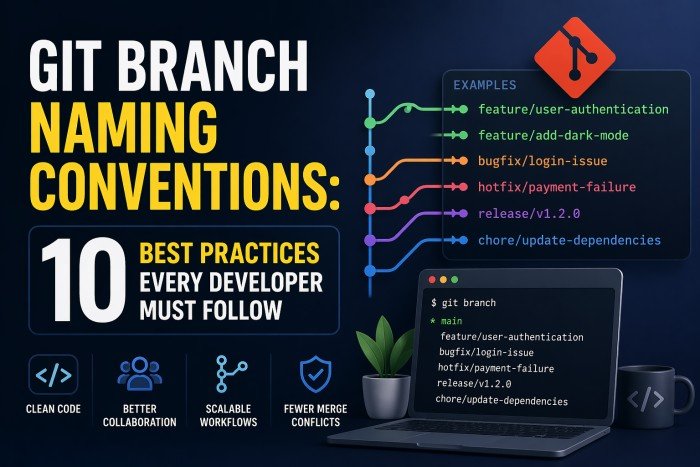
Learn the best git branch naming conventions with 10 proven practices every developer should follow. Discover how to name branches for features, bug fixes, and hotfixes using clear, scalable patterns that improve team collaboration and CI/CD workflows.
Table of Contents
Introduction
Why Git Branch Naming Conventions Matter
Imagine joining a new project and seeing branch names like test2, johns-branch, FINALFINAL, and fix_thing. You have no idea what each branch does, who owns it, or whether it’s safe to delete. This is the chaos that happens without clear git branch naming conventions.
Good branch naming is like labeling boxes when you move house. It seems tedious at first, but when you need to find something at 2am, you’ll be very glad you did it.
How Bad Naming Slows Down Teams
Real-World Scenario
temp-fix. Three weeks later, nobody knows if it was merged. The CI/CD pipeline has no idea what environment to deploy it to. The team spends 45 minutes tracing git history. Result: delayed release, frustrated team, angry client.Poorly named branches cause:
- Wasted time searching for the right branch
- Failed or misfired CI/CD pipeline triggers
- Confusion during code reviews and merges
- Difficulty onboarding new team members
What Are Git Branch Naming Conventions?
Definition and Purpose
Git branch naming conventions are agreed-upon rules that your team follows when creating branch names. These rules define the format, structure, and content of every branch name in your repository.
A convention is more than a suggestion — it’s a shared standard that creates consistency across your entire codebase and team. Think of it like a naming system for files on your computer: once everyone follows the same pattern, finding anything becomes instant.
How Naming Impacts Collaboration and CI/CD
Modern development relies heavily on automation. Your CI/CD pipelines, deployment tools, and project management integrations all read branch names to trigger the right actions. A branch named feature/ can automatically trigger a staging deployment. A branch named hotfix/ can trigger urgent review notifications.
10 Best Practices for Git Branch Naming
Let’s go through each practice in detail — with real examples you can copy and use right now.
Use Consistent Naming Patterns
Pick one pattern and use it everywhere, always. Consistency is the single most important rule. Even an imperfect pattern applied consistently beats a perfect pattern applied randomly.
# Consistent: type/scope-description
feature/user-authentication
feature/payment-gateway
bugfix/login-redirect-error
hotfix/null-pointer-crash

# Inconsistent: avoid this
UserAuth
fix-payment
hotfix/nullPointer
johns-new-featurePrefix Branches by Type (feature/, bugfix/, hotfix/)
Use a type prefix as the first part of every branch name. This instantly tells anyone — and any tool — what kind of work this branch contains.
feature/add-dark-mode          # new functionality
bugfix/fix-search-results      # non-urgent bug fix
hotfix/patch-security-vuln      # urgent production fix
release/2.4.0                  # release preparation
chore/update-dependencies       # maintenance tasks
refactor/auth-module-cleanup   # code improvement
docs/update-api-readme         # documentation only
test/add-unit-tests-cart # test additionsKeep Branch Names Short but Descriptive
Aim for 3–5 words in the description part of the branch name. Long enough to understand, short enough to type without pain. Ask yourself: “Can I understand this branch’s purpose in 2 seconds?”
# Too vague — doesn't explain anything
feature/stuff
bugfix/fix

# Too long — hard to type, hard to scan
feature/add-the-new-user-profile-page-with-avatar-upload-and-settings

# Just right — clear and concise
feature/user-profile-page
feature/avatar-upload
bugfix/profile-save-errorUse Hyphens Instead of Spaces or Underscores
Spaces are illegal in branch names. Hyphens (-) are the standard separator and are preferred over underscores (_) because they’re easier to read and type, and work cleanly in URLs and terminal commands.
# Never use spaces
feature/add user login   # ← Git will reject this

# Underscores work but are less readable
feature/add_user_login

# Hyphens: the gold standard
feature/add-user-login # ← Use thisInclude Issue or Ticket IDs
Including a ticket ID from your project management tool (Jira, Linear, GitHub Issues, etc.) links your branch directly to the original requirement. This makes traceability effortless — you can always find why a change was made.
# Jira-style ticket IDs
feature/PROJ-1234-user-authentication
bugfix/PROJ-892-fix-login-redirect
hotfix/PROJ-1501-payment-null-error

# GitHub Issues style
feature/issue-42-dark-mode-toggle
bugfix/issue-87-search-crash

# Linear-style (auto-generated short IDs)
feature/eng-234-onboarding-flowUse Lowercase Letters Only
Always use lowercase. Mixed case creates inconsistency and causes subtle bugs — some file systems (macOS HFS+) are case-insensitive, meaning Feature/Login and feature/login can appear to be the same branch locally but differ on the remote.
# Avoid uppercase and mixed case
Feature/UserLogin
HOTFIX/CRITICAL-BUG
bugFix/LoginIssue

# Always use lowercase
feature/user-login
hotfix/critical-bug
bugfix/login-issueAvoid Special Characters
Some characters are either illegal or cause weird behavior in Git, shells, and URLs. Stick to letters, numbers, hyphens, and forward slashes (for the type separator) only.
# Characters that cause problems
feature/add@login         # @ conflicts with refspecs
feature/fix!email         # ! has shell meaning
feature/new#feature       # # is a comment in shells
feature/new~feature       # ~ means ancestor in Git
feature/auth..module      # .. is a range operator

# Safe characters only
feature/add-login         # letters + hyphens ✓
feature/PROJ-123-login # numbers + uppercase ticket ID ✓Use Action-Based Naming (add-, fix-, update-, remove-)
Starting the description with a verb makes the branch name read like an instruction — it’s immediately clear what action the branch performs. This also aligns naturally with commit message conventions.
# Action-first naming is clear and active
feature/add-search-filters
feature/update-user-profile-ui
feature/remove-legacy-auth
bugfix/fix-cart-calculation
refactor/simplify-auth-module
chore/migrate-to-node-20

# Noun-only names are less clear
feature/search-filters     # add, remove, or update?
feature/user-profile # what's being done to it?Group by Scope or Module
For larger codebases, add a scope segment to group related branches together. This makes it easy to filter and find all branches related to a specific module or area of your application.
# type/scope/description format
feature/auth/add-oauth-google
feature/auth/refresh-token-flow
feature/payments/add-stripe-checkout
feature/payments/update-invoice-pdf
bugfix/api/fix-rate-limit-header
bugfix/ui/fix-modal-overflow

# Filter all auth branches instantly
git branch --list "feature/auth/*"Follow Team or Workflow Standards (Git Flow, Trunk-Based)
Your naming conventions should align with your team’s branching strategy. Git Flow uses long-lived branches with strict naming. Trunk-Based Development uses short-lived branches that merge to main rapidly. Choose one and document it.
# Git Flow standard branches
main                          # production code
develop                       # integration branch
feature/PROJ-123-dark-mode    # feature work
release/2.4.0                 # release prep
hotfix/2.3.1-session-bug     # production fix

# Trunk-Based naming (short-lived)
main                          # always deployable
feature/add-login             # merged in < 2 days
fix/api-timeout # small, focused fixGit Branch Naming Examples (Copy & Use)
Here are real-world git branch naming examples organized by type. Copy these patterns and adapt them to your project.
Feature Branch Examples
feature/add-user-registration
feature/PROJ-101-social-login
feature/auth/add-two-factor-auth
feature/update-dashboard-charts
feature/payments/integrate-paypal
feature/add-email-notifications
feature/PROJ-250-onboarding-wizard
feature/api/add-rate-limitingBugfix Branch Examples
bugfix/fix-login-redirect-loop
bugfix/PROJ-342-cart-total-wrong
bugfix/fix-null-user-session
bugfix/ui/fix-button-overlap-mobile
bugfix/fix-image-upload-timeout
bugfix/PROJ-419-email-not-sentHotfix Branch Examples
hotfix/patch-xss-vulnerability
hotfix/2.3.1-fix-payment-crash
hotfix/PROJ-999-db-connection-leak
hotfix/critical-session-expiry-bugRelease Branch Examples
release/2.4.0               # semantic versioning
release/2024-q2             # quarterly releases
release/spring-2025         # named releases
release/v3.0.0-beta # pre-releasePro tip
git checkout -b feature/PROJ-101-social-login — then push with git push -u origin HEAD.Common Git Branch Naming Mistakes to Avoid
Mistake 01 — Inconsistent Naming Across Team
feature/, another uses feat/, another uses nothing at all. The result is an unfiltered mess that breaks CI/CD patterns.fix
Mistake 02 — Overly Long or Unclear Names
feature/this-is-the-branch-where-i-am-adding-the-new-user-authentication-and-profile-page-for-the-sprint-3-requirements are unreadable. Nobody will type that.fix
Mistake 03 — Missing Context or IDs
fix, test2, wip, or johns-branch tell you nothing about what the branch does or why it exists.fix
Mistake 04 — Mixing Naming Styles
featureUserLogin), snake_case (feature_user_login), and kebab-case (feature-user-login) in the same repo is confusing and breaks pattern matching.fix
Mistake 05 — Using Your Name as the Branch Name
sarah or mike-work are useless once the person leaves the project. Branch names should describe work, not people.fix
Git Branch Naming Strategy for Teams
Small vs Large Teams
Small Teams (1–5 devs)
bugfix/fix-header
hotfix/patch-crash
Simple: type/description
Large Teams (6+ devs)
feature/auth/oauth-google
bugfix/PROJ-99/fix-header
Add: ticket IDs + scopes
Aligning with CI/CD Pipelines
Your branch names are inputs to your automation. When you name branches consistently, your pipelines can react intelligently:
# Trigger deploy to staging for feature branches
on:
  push:
    branches:
      - 'feature/**'     # all feature branches → staging
      - 'release/**'    # all release branches → pre-prod

# Trigger production deploy only for main
  push:
    branches:
      - main             # main → production

# Hotfix gets fast-tracked review
- 'hotfix/**' # hotfix → urgent review queueEnforcing Naming Rules with Tools and Hooks
Don’t rely on memory — automate enforcement. Use Git hooks to reject badly named branches before they’re pushed.
#!/bin/bash
# Enforce branch naming convention

BRANCH=$(git rev-parse --abbrev-ref HEAD)
VALID_PATTERN="^(feature|bugfix|hotfix|release|chore|refactor|docs|test)/.+"

if ! [[ $BRANCH =~ $VALID_PATTERN ]]; then
  echo "❌ Branch name '$BRANCH' does not follow conventions."
  echo "✓  Use: feature/my-feature | bugfix/fix-issue | hotfix/urgent-fix"
  exit 1
fi

echo "✓ Branch name '$BRANCH' is valid."Tools to help enforce conventions
Git Flow vs Trunk-Based Naming
| Aspect | Git Flow | Trunk-Based Development |
|---|---|---|
| Main branches | main, develop | main only |
| Feature branches | feature/PROJ-123-login | feature/add-login |
| Branch lifespan | Days to weeks | Hours to 2 days |
| Release branches | release/2.4.0 | Rarely used |
| Hotfix branches | hotfix/2.3.1-crash-fix | fix/critical-crash |
| Best for | Versioned products, apps with scheduled releases | SaaS, continuous deployment, fast teams |
Git Flow Naming — When to Use It
Git Flow works best when you ship versioned releases (mobile apps, packaged software, libraries). The structured branch hierarchy (feature → develop → release → main) gives you controlled release cycles.
Trunk-Based Naming — When to Use It
Trunk-based development thrives in continuous delivery environments. Branches are tiny, fast, and merge to main within 1–2 days. Branch names are shorter because branches don’t live long enough to need heavy documentation.
(feature → main → deploy)
Quick Git Branch Naming Checklist
Before pushing your next branch, run through this 10-point checklist:
Starts with a type prefix
All lowercase
Uses hyphens as separators
No special characters
Short and descriptive (3–5 words)
Includes ticket/issue ID (if applicable)
Uses action verbs
Follows team’s agreed convention
Matches your workflow (Git Flow or Trunk)
Will work with CI/CD pipeline patterns
🎯 Key Takeaways
Git branch naming conventions are one of the highest-ROI improvements your team can make. A few minutes spent on a clear naming standard saves hours of confusion, prevents CI/CD failures, and makes your entire team faster.
Start simple: Just adopt the type prefix pattern (feature/, bugfix/, hotfix/) and lowercase hyphens. You can add ticket IDs and scopes as your team grows.
git checkout -b feature/your-descriptive-name
How to Implement Naming Conventions in Your Team Today
Here’s a quick 3-step plan to roll this out:
Implementation Plan
CONTRIBUTING.md or wiki. Define the allowed prefixes and the pattern you’ll use.Step 2. Add a Git hook or linterUse the pre-push hook example from this article or install a branch-naming linter to auto-enforce the standard.
Step 3. Review and refine after 2 weeksRun a quick team retro on the convention. Adjust anything that’s causing friction. Naming standards should serve the team, not stress them out.
Read also how to change git commit message or the differences between git merge and rebase commands.