Discover code review best practices, effective code review process, and pull request review techniques. Master GitHub pull request reviews and Azure DevOps code review workflows.
Everything your team needs to run an effective code review process — from opening a PR to approving the final merge. Practical, opinionated, and tool-specific.
Table of Contents
What Is Code Review in Software Engineering?
Definition
Code review in software engineering is a systematic examination of source code by one or more developers who did not write it. The goal is to identify defects, share knowledge, and ensure the codebase adheres to the team’s agreed-upon standards — all before the code reaches production.
At its most common, this happens through a pull request (also called a merge request). One developer opens a PR with their changes; others examine, comment, and either approve or request revisions. It’s the last human checkpoint before code enters the main branch.
Code Review by the Numbers
Why It Matters
There are three core reasons every engineering team should treat code review as a non-negotiable part of the development workflow:
- Quality gate. A reviewer catches edge cases, logic errors, and security issues that automated tests miss. Two pairs of eyes consistently outperform one.
- Knowledge sharing. When developers read each other’s code, they stay up to speed with changes across the codebase. Silos disappear. Bus-factor risk drops.
- Bug prevention. Catching a bug in review costs a fraction of what it costs to fix in production — in time, reputation, and sometimes revenue.
Terminology note
Code Review Process (Step-by-Step)
A repeatable, team-wide code review process removes ambiguity and keeps velocity high. Here is the five-stage flow that scales from startup to enterprise:
main (or the relevant base branch). A meaningful title and a PR template description come first — reviewers should never have to guess what they’re looking at.Day in the life: a 3-person backend team
main. Total review time: 45 minutes. Production incidents prevented: at least 2.Code Review Best Practices
These code review good practices apply regardless of the tool you use — GitHub, Azure DevOps, GitLab, or anything else. Adopt these as team norms, not individual habits.
Keep PRs Small
Large PRs are the single biggest destroyer of review quality. When a reviewer faces 1,200 lines of diff, they skim. When they face 150 lines, they read carefully. Aim for PRs that do one thing and do it completely.
Anti-pattern
Best practice
Write a Clear PR Description
Every PR description should answer three questions without the reviewer having to ask:
- What changed? — A plain-language summary of the diff.
- Why? — Link to the ticket, spec, or the business reason.
- How to test? — Steps to reproduce the scenario, or what automated tests cover it.
## What changed?
Replaced synchronous DB calls in `OrderService` with async/await
to reduce P95 latency on the checkout endpoint.

## Why?
Resolves JIRA-4821 — checkout was blocking the event loop under load.

## How to test?
1. Run `npm test -- --testPathPattern=order`
2. Manually: POST /api/checkout with payload in `docs/test-payloads.json`
3. Check that response time < 200ms in staging

## Screenshots / logs
Before: avg 640ms · After: avg 138ms (load test attached)Focus on Logic, Not Style
Style debates — trailing commas, brace position, quote style — belong in a linter config, not in code review comments. If your team spends even 10% of review time on formatting, you’re wasting engineering hours. Automate style; humanize logic.
Best Practice
Use Automation (Linters, CI, Static Analysis)
Automation handles the mechanical. Humans handle the meaningful. Your review pipeline should include:
- Linters & formatters — catch style and syntax issues.
- Unit & integration tests — must pass before review begins.
- Static analysis — SonarQube, Semgrep, or CodeClimate for security and complexity issues.
- Dependency scanning — Dependabot, Snyk, or similar.
Be Constructive, Not Critical
The goal of a review comment is to improve the code, not to demonstrate your knowledge or authority. Frame feedback as suggestions, ask questions instead of making demands, and always explain why a change matters.
Unhelpful comment
Constructive comment
Pull Request Review Best Practices
Being a great reviewer is a skill. Here is how to approach a pull request review efficiently and thoroughly.
How to Review Efficiently
- Read the description first. Understand the intent before reading a single line of code.
- Start with the high-level. Look at the file list. Is the scope right? Any unexpected changes?
- Then go deep. Focus on the core logic files. Save tests and config for last.
- Timebox it. 60 minutes per session max. Attention degrades sharply after that.
- Review in one pass. Don’t dip in and out of the same PR over days. Block time and finish.
What to Look For
Reviewer focus areas
✓ Readability: Can a new team member understand this in 5 minutes?
✓ Performance: Any N+1 queries, blocking calls, or unnecessary allocations?
✓ Security: Is input validated? Are secrets handled correctly? SQL injection risk?
✓ Test coverage: Are new branches and error paths tested?
✓ API contracts: Are breaking changes documented and versioned?
✓ Dependencies: Are new libraries justified? Are they maintained and licensed correctly?
Common Reviewer Mistakes
Watch out for these
The “LGTM” Problem
orders scales?”How to Review Pull Requests in GitHub
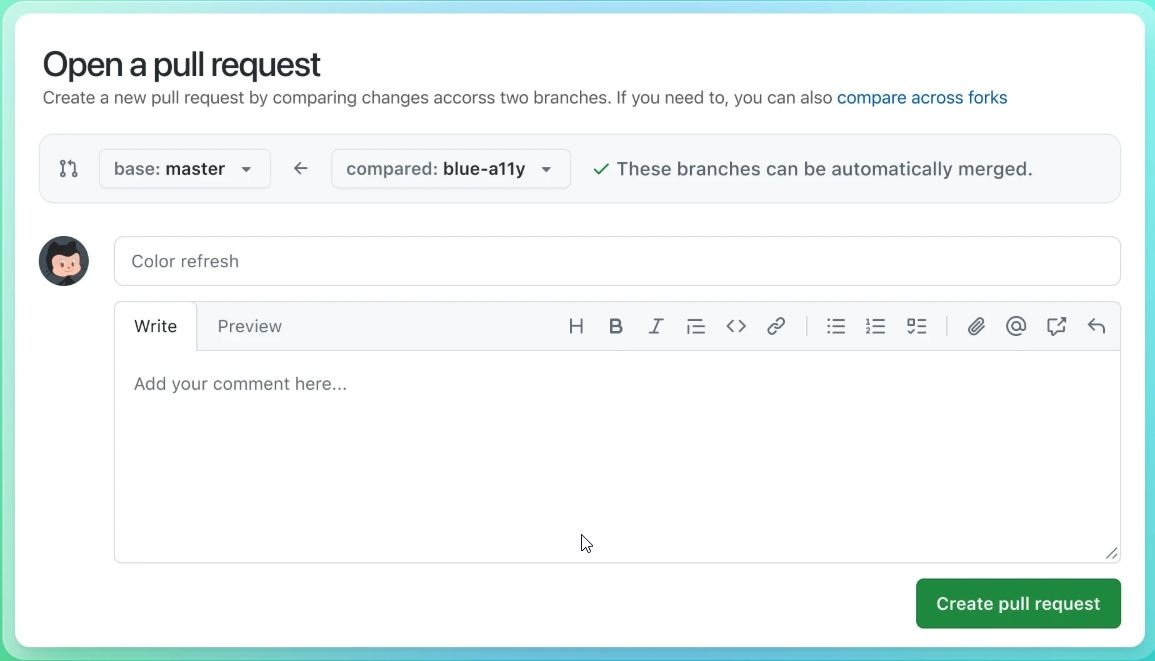
GitHub review pull request functionality is built into the PR interface. Here’s the complete workflow for both authors and reviewers.
Requesting a Review
When you open a PR, use the Reviewers sidebar on the right to add reviewers by username or team name. GitHub will notify them immediately. You can also use CODEOWNERS to auto-assign reviewers for specific directories:
# Global owners
*                   @org/core-team

# Backend services
/src/api/           @org/backend-team

# Infrastructure changes always reviewed by DevOps
/infra/             @org/devops @alice
/docker/            @org/devops

# Payments: two required reviewers
/src/payments/ @bob @carolGitHub tip
Leaving Comments
GitHub offers three types of feedback during a github review pull request:
- Line comments — Click the
+on any diff line to leave specific inline feedback. You can comment on a single line or drag to select a range. - Suggested changes — Use the suggest block to propose an exact code replacement the author can accept with one click.
- General review summary — Submitted when you finish the review, visible at the top of the PR timeline.
Consider using optional chaining here to avoid the null check:

```suggestion
const userName = user?.profile?.name ?? 'Anonymous';
```

This removes the explicit null guard and is safer if
`profile` is also nullable.Approving or Requesting Changes
When you click Finish your review, GitHub asks you to choose one of three states:
- Comment — Feedback without a formal vote. Use for questions or FYI notes.
- Approve — You’re satisfied. The PR is ready to merge (pending other required approvals).
- Request changes — The PR must not be merged until specific issues are addressed. The author will be notified and the PR will be marked as blocked.
The full GitHub PR Review loop
How to Do Code Review in Azure DevOps
Azure DevOps code review happens through Pull Requests inside Azure Repos. The workflow is similar to GitHub but with some enterprise-grade policy controls built in.
Pull Request Workflow in Azure DevOps
- Push your branch and navigate to Repos → Pull Requests → New Pull Request.
- Set the source and target branch, add a title and description.
- Add reviewers — individually or from a team. Mark reviewers as Required or Optional.
- Link work items (user stories, bugs) to give context to the review.
- Submit the PR — reviewers are notified automatically.
Branch Policies
Azure DevOps lets you enforce merge requirements through Branch Policies (Project Settings → Repos → Policies). Recommended settings for a team enforcing strong code review good practices:
# Azure DevOps Branch Policy (conceptual representation)

branch: main

policies:
  minimum_approvers: 2
  require_linked_work_items: true
  reset_votes_on_push: true       # reviewers must re-approve after new commits
  allow_requester_to_approve: false

build_validation:
  - pipeline: ci-build
    trigger_type: automatic
    required: true

comment_requirements: Required # all threads must be resolved before mergeAzure DevOps tip
Merge Requirements & Completion
Azure DevOps supports four merge strategies. Choose based on your team’s preference for history clarity:
- Merge commit — Preserves full history. Best for audit trails.
- Squash merge — Collapses the branch into one commit. Cleanest
mainhistory. - Rebase and fast-forward — Linear history without merge commits.
- Semi-linear merge — Rebase first, then merge commit. A middle ground.
How a 40-person team uses Azure DevOps policies
main: one from the owning squad, one from a security reviewer for any change touching /src/payments/. Build validation runs a 12-minute CI pipeline. Comment resolution is mandatory. Auto-complete is enabled — once all conditions are met, the PR merges without the author having to return. This setup catches issues without creating merge bottlenecks.Code Review Checklist (Quick Reference)
Use this checklist as a shared team reference. Pin it to your wiki, drop it into your PR template, or use it as a reviewer’s starting point before writing the first comment.
Security
✓ No secrets, API keys, or credentials in code or logs
✓ Authentication and authorization are checked at the right layer
✓ SQL queries use parameterized statements (no string concatenation)
✓ Dependency versions are pinned and not known-vulnerable
✓ Error messages don’t leak internal stack traces to clients
Performance
✓ Expensive operations are not duplicated unnecessarily
✓ Large data sets are paginated, not loaded into memory at once
✓ Caching is used where appropriate (and invalidated correctly)
✓ Algorithmic complexity is reasonable for expected data size
Readability
✓ Functions are short and do one thing
✓ Complex logic has explanatory comments (not noise comments)
✓ No dead code, commented-out blocks, or debug statements
✓ Code follows team conventions consistently
Tests
✓ Error paths and edge cases have dedicated test cases
✓ Tests have descriptive names that explain the scenario
✓ No tests are skipped or commented out without explanation
✓ Integration tests cover the critical path end-to-end
Ship this to your team
.github/pull_request_template.md (GitHub) or the PR description template in Azure DevOps project settings. When it’s visible in every PR, reviewers use it automatically — no reminders needed.SUMMARY
Want to improve your Git workflow even further? Check out my guides on Git Branch Naming Conventions and Best Branching Git Workflow to Follow for cleaner, more scalable development practices.